mirror of
https://github.com/shuaiplus/nodewarden.git
synced 2026-06-20 21:00:41 +00:00
 shuaiplus
170 lines
7.5 KiB
Markdown
170 lines
7.5 KiB
Markdown
<p align="center">
|
||
<img src="./NodeWarden.png" alt="NodeWarden Logo" />
|
||
</p>
|
||
|
||
<p align="center">
|
||
A third-party Bitwarden server running on Cloudflare Workers, fully compatible with official clients.
|
||
</p>
|
||
|
||
[](https://workers.cloudflare.com/)
|
||
[](./LICENSE)
|
||
[](https://github.com/shuaiplus/NodeWarden/releases/latest)
|
||
[](https://github.com/shuaiplus/NodeWarden/actions/workflows/sync-upstream.yml)
|
||
|
||
[Release Notes](./RELEASE_NOTES.md) • [Report an Issue](https://github.com/shuaiplus/NodeWarden/issues/new/choose) • [Latest Release](https://github.com/shuaiplus/NodeWarden/releases/latest)
|
||
|
||
中文文档:[`README.md`](./README.md)
|
||
|
||
> **Disclaimer**
|
||
> This project is for learning and communication purposes only. We are not responsible for any data loss; regular vault backups are strongly recommended.
|
||
> This project is not affiliated with Bitwarden. Please do not report issues to the official Bitwarden team.
|
||
|
||
---
|
||
|
||
## Feature Comparison Table (vs Official Bitwarden Server)
|
||
|
||
| Capability | Bitwarden | NodeWarden | Notes |
|
||
|---|---|---|---|
|
||
| Web Vault (logins/notes/cards/identities) | ✅ | ✅ | Web-based vault management UI |
|
||
| Folders / Favorites | ✅ | ✅ | Common vault organization supported |
|
||
| Full sync `/api/sync` | ✅ | ✅ | Compatibility and performance optimized |
|
||
| Attachment upload/download | ✅ | ✅ | Choose either Cloudflare R2 or KV |
|
||
| Import / export | ✅ | ✅ | Fully implemented, including Bitwarden vault + attachments ZIP import |
|
||
| Website icon proxy | ✅ | ✅ | Via `/icons/{hostname}/icon.png` |
|
||
| passkey / TOTP fields | ✅ | ✅ | Fully supported, no premium required |
|
||
| Send | ✅ | ✅ | Choose either Cloudflare R2 or KV |
|
||
| Multi-user | ✅ | ✅ | Full user management with invitation mechanism |
|
||
| Organizations / Collections / Member roles | ✅ | ❌ | Not necessary to implement |
|
||
| Login 2FA (TOTP/WebAuthn/Duo/Email) | ✅ | ⚠️ Partial | User-level TOTP only |
|
||
| SSO / SCIM / Enterprise directory | ✅ | ❌ | Not necessary to implement |
|
||
| Emergency access | ✅ | ❌ | Not necessary to implement |
|
||
| Admin console / Billing & subscription | ✅ | ❌ | Free only |
|
||
| Full push notification pipeline | ✅ | ❌ | Not necessary to implement |
|
||
|
||
## Tested clients / platforms
|
||
|
||
- ✅ Windows desktop client (v2026.1.0)
|
||
- ✅ Mobile app (v2026.1.0)
|
||
- ✅ Browser extension (v2026.1.0)
|
||
- ✅ Linux desktop client (v2026.1.0)
|
||
- ⬜ macOS desktop client (not tested)
|
||
|
||
---
|
||
|
||
# Quick start
|
||
|
||
### One-click deploy
|
||
|
||
> **If you only want a quick trial, simply click the one-click deploy button in step 2. The remaining steps are mainly for long-term maintenance.**
|
||
|
||
1. Fork this repository and name it **NodeWarden**.
|
||
2. Click the button below. On the page that opens, rename the project to **NodeWarden2** and set **JWT_SECRET** to a random 32-character string.
|
||
|
||
[](https://deploy.workers.cloudflare.com/?url=https://github.com/shuaiplus/NodeWarden)
|
||
3. After deployment, open the Worker settings on the same page and disconnect the **Git repository**.
|
||
4. Reconnect the **Git repository** to the fork from step 1, then change the **Name** field at the bottom to **NodeWarden**.
|
||
5. The temporary **NodeWarden2** repository can be deleted.
|
||
|
||
<details>
|
||
<summary><b>📦 If you do not have a payment method attached and cannot enable R2 object storage, you can use KV mode instead</b></summary>
|
||
|
||
<br>
|
||
|
||
>- **R2**: requires a payment method; **single attachment / Send file limit is 100 MB** (project-level limit, editable in code); **10 GB free storage**
|
||
>- **KV**: no card required; **single attachment / Send file limit is 25 MiB** (Cloudflare limit, not editable); **1 GB free storage**
|
||
>
|
||
>1. Fork this repository and name it **NodeWarden**.
|
||
>2. Open the new repository, go to `Actions`, click `I understand my workflows, go ahead and enable them`, then run `Switch to KV mode`.
|
||
>3. After that, **in your own repository**, click the button below. On the page that opens, rename the project to **NodeWarden2** and set **JWT_SECRET** to a random 32-character string. Do not select `Create dedicated Git repository`.
|
||
>
|
||
> [](https://deploy.workers.cloudflare.com/?url=https://github.com/shuaiplus/NodeWarden)
|
||
>
|
||
>4. On the same page, open Worker settings and disconnect the `Git repository`.
|
||
>5. Go back to your forked repository (**NodeWarden**) on GitHub, open `Actions`, and run `Import KV ID from NodeWarden2`.
|
||
>6. Return to Cloudflare, reconnect the `Git repository` to your forked repository (**NodeWarden**), and change the `Name` field at the bottom back to **NodeWarden**.
|
||
>7. The GitHub repository **NodeWarden2** can then be deleted.
|
||
</details>
|
||
|
||
> [!TIP]
|
||
> Sync upstream (keep your fork updated):
|
||
>- Manual: open your fork on GitHub, click `Sync fork`, then click `Update branch`.
|
||
>- Automatic: in your fork, go to `Actions` -> `Sync upstream` -> `Enable workflow`. It will automatically sync from upstream every day at 3 AM.
|
||
|
||
### CLI deploy
|
||
|
||
```powershell
|
||
# Clone repository
|
||
git clone https://github.com/shuaiplus/NodeWarden.git
|
||
cd NodeWarden
|
||
|
||
# Install dependencies
|
||
npm install
|
||
|
||
# Cloudflare CLI login
|
||
npx wrangler login
|
||
|
||
# Create cloud resources (D1 + R2)
|
||
npx wrangler d1 create nodewarden-db
|
||
npx wrangler r2 bucket create nodewarden-attachments
|
||
|
||
# Deploy
|
||
npm run deploy
|
||
|
||
# (Optional) KV mode (no R2 / no credit card)
|
||
npx wrangler kv namespace create ATTACHMENTS_KV
|
||
# Replace placeholder inside `id = "placeholder"` in wrangler.kv.toml with the returned namespace id (keep the quotes)
|
||
npm run deploy:kv
|
||
|
||
# To update later: re-clone and re-deploy — no need to recreate cloud resources
|
||
git clone https://github.com/shuaiplus/NodeWarden.git
|
||
cd NodeWarden
|
||
npm run deploy
|
||
```
|
||
|
||
---
|
||
## Local development
|
||
|
||
This repo is a Cloudflare Workers TypeScript project (Wrangler).
|
||
|
||
```bash
|
||
npm install
|
||
npm run dev
|
||
```
|
||
---
|
||
|
||
## FAQ
|
||
|
||
**Q: How do I back up my data?**
|
||
A: Use **Export vault** in your client and save the JSON file.
|
||
|
||
**Q: Which import/export formats are supported?**
|
||
A: NodeWarden supports Bitwarden `json/csv/vault + attachments zip` and NodeWarden `vault + attachments json` in both plain and encrypted modes, and every format visible in the import selector is directly importable.
|
||
A: It also supports direct import of Bitwarden `vault + attachments zip`, which is not directly supported by official Bitwarden Web import.
|
||
|
||
**Q: What if I forget the master password?**
|
||
A: It can’t be recovered (end-to-end encryption). Keep it safe.
|
||
|
||
**Q: Can multiple people use it?**
|
||
A: Yes. The first registered user becomes the admin. The admin can generate invite codes from the admin panel, and other users register with those codes.
|
||
|
||
---
|
||
|
||
## License
|
||
|
||
LGPL-3.0 License
|
||
|
||
---
|
||
|
||
## Credits
|
||
|
||
- [Bitwarden](https://bitwarden.com/) - original design and clients
|
||
- [Vaultwarden](https://github.com/dani-garcia/vaultwarden) - server implementation reference
|
||
- [Cloudflare Workers](https://workers.cloudflare.com/) - serverless platform
|
||
|
||
|
||
|
||
---
|
||
## Star History
|
||
|
||
[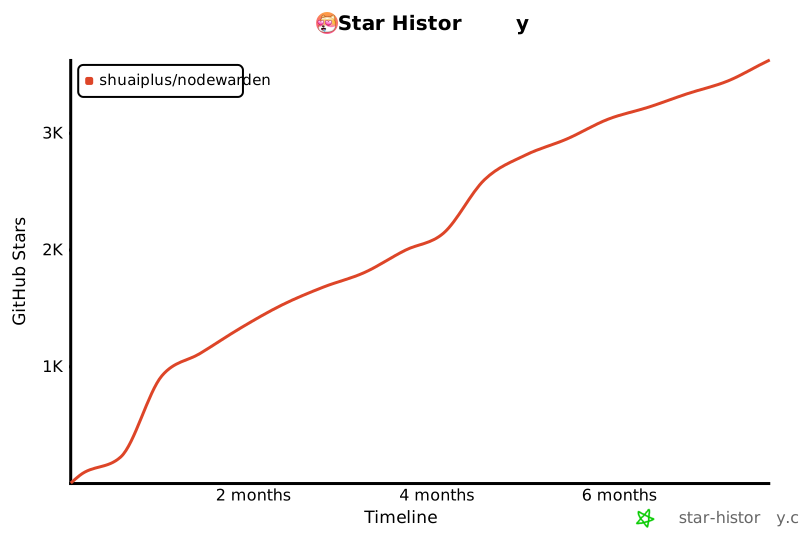](https://www.star-history.com/#shuaiplus/NodeWarden&type=timeline&legend=top-left)
|